VisiCalc reconstructed
VisiCalc
Spreadsheets rule the world for almost half of a century. I strongly believe that it’s one of the best UXs ever created. Being fairly minimal and easy to learn, it allows users to quickly manipulate data, describe logic, visualise results, or even create art and run GameBoy games.
It all started in 1979 when Dan Bricklin and Bob Frankston created VisiCalc, the first spreadsheet software. With a few thousand lines of hand-written 6502 assembly, VisiCalc could successfully run on 16K RAM machines. It quickly became a “killer app” for Apple ][, selling over 1 million copies and turning early personal computers into serious business tools.
I thought it would be an interesting exercise trying to rebuild minimal VisiCalc clone from scratch. All we need is a data model, formula evaluator, and a simple UI to display the cells. At the end we’ll have something like this:
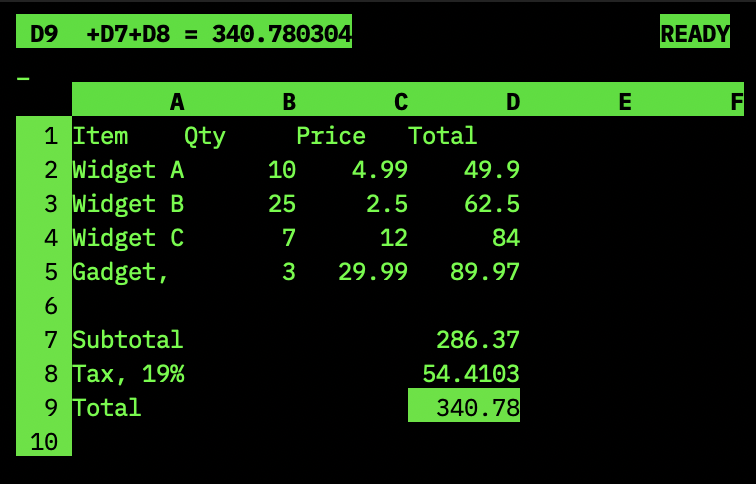
Cells
Like almost everything in life, a spreadsheet is made of cells. Each cell can contain a value, a formula, or be empty. Values can be numbers or text. Formulas are basic mathematical expressions that can reference other cells. You all know it from Excel, but in VisiCalc formula prefix was usually + instead of =, for example +A1+A2*B1 is a formula, while A1 is a text value.
#define MAXIN 128  // max cell input length
enum { EMPTY, NUM, LABEL, FORMULA };  // cell types
struct cell {
  int type;
  float val;
  char text[MAXIN];  // raw user input
};
This should be sufficient to represent the cells in our spreadsheet. A spreadsheet itself is a grid of cells. Excel has limits of 1,048,576 rows and 16,384 columns, VisiCalc had 256 rows and 64 columns. We can start even smaller:
#define NCOL 26    // max number of columns (A..Z)
#define NROW 50    // max number of rows
struct grid {
  struct cell cells[NCOL][NROW];
};
Formulas
Now we need to implement formula evaluator. We can use a simple recursive descent parser that calculates the formula on the fly. Since formulas might contain references, a parser should be aware of the grid and be able to fetch values from it.
struct parser {
  const char* s;
  int pos;
  struct grid* g;
};
We start with a top-level function expr that evaluates a complete expression. It calls term to evaluate terms, which in turn calls factor to evaluate factors. A factor can be a number, a cell reference, or a parenthesised expression.
// skip whitespace characters
void skipws(struct parser* p) { for (; isspace(*p->p); p->p++); }
// parse cell reference like A1, AA12 etc
int ref(const char* s, int* col, int* row) { ... }
// parse number
float number(struct parser* p) { ... }
// parse cell reference and return its value
static float cellval(struct parser* p) { ... }
// parse function call like @SUM(A1...B5) or @ABS(-A1)
float func(struct parser* p) { ... }
// parse primary expression (number, cell reference, function call, parenthesised expression)
float primary(struct parser* p) { ... }
// parse term (factor [*|/ factor]*)
float term(struct parser* p) { ... }
// parse expression (term [+|- term]*)
float expr(struct parser* p) { ... }
We start with a classical top-down parser structure: top-level expressions are parsed as terms separated by + or -, terms are parsed as factors separated by * or /, and factors are parsed as primitives, such as numbers, cell references, function calls, or parenthesised expressions:
float primary(struct parser* p) {
  skipws(p);
  if (!*p->p) return NAN;
  if (*p->p == '+') p->p++;
  if (*p->p == '-') {
    p->p++;
    return -primary(p);
  }
  if (*p->p == '@') {
    p->p++;
    return func(p);
  }
  if (*p->p == '(') {
    p->p++;
    float v = expr(p);
    skipws(p);
    if (*p->p != ')') return NAN;
    p->p++;
    return v;
  }
  if (isdigit(*p->p) || *p->p == '.') return number(p);
  return cellval(p);
}

float term(struct parser* p) {
  float l = primary(p);
  for (;;) {
    skipws(p);
    char op = *p->p;
    if (op != '*' && op != '/') break;
    p->p++;
    float r = primary(p);
    if (op == '*')
      l *= r;
    else if (r == 0)
      return NAN;
    else
      l /= r;
  }
  return l;
}

float expr(struct parser* p) {
  float l = term(p);
  for (;;) {
    skipws(p);
    char op = *p->p;
    if (op != '+' && op != '-') break;
    p->p++;
    float r = term(p);
    l = (op == '+') ? l + r : l - r;
  }
  return l;
}
We use NAN to indicate errors, which propagates nicely through the floating point calculations - almost every operation on NAN results in a NAN. Cell references are parsed using a simple function that converts column letters to numbers and row digits to numbers. For our limited grid we could use sscanf(s, "%c%d", col, row) but we can also parse it properly, to support more columns and rows, such as “AB123”:
int ref(const char* s, int* col, int* row) {
  char* end;
  const char* p = s;
  if (!isalpha(*p)) return 0;
  *col = toupper(*p++) - 'A';
  if (isalpha(*p)) *col = *col * 26 + (toupper(*p++) - 'A');
  int n = strtol(p, &end, 10);
  if (n <= 0 || end == p) return 0;
  *row = n - 1;
  return (int)(end - s);
}
Parsing numbers is straightforward, but parsing functions is a bit more complex. We need to support both single-argument functions like @ABS(-A1) and range functions like @SUM(A1...C3). You can check the final sources to see how it’s done. I’m only going to support @SUM, @ABS, @INT, @SQRT in this post, but adding more functions shouldn’t be too hard.
Having the parser implemented, we can now evaluate formulas in the cells:
struct grid g;
struct parser p = { .g = &g };

// A1 := 42
g.cells[0][0].val = 42; g.cells[0][0].type = NUMBER;
// A2 := 123
g.cells[0][1].val = 123; g.cells[0][1].type = NUMBER;

p.s = p.p = "+A1+A2*4";
float n = expr(&p); // n = 534
Is that it?
Having expression evaluator brings the core functionality to the spreadsheet, but it’s not enough due to reactive nature of calculations. A cell may contain a formula that references other cells, and when those cells change, the formula should be re-evaluated.
One way of doing this is to keep track of all dependencies between the cells and trigger updates when necessary. Maintaining a dependency graph would give us the most efficient updates, but it’s often an overkill for a spreadsheet.
VisiCalc made it work for 16K RAM machines using a simpler trick. On every cell update it re-evaluated the whole spreadsheet. User was free to choose row-first or column-first evaluation order. VisiCalc manual says that on large spreadsheets on the glorious computers from the past recalculation might take a few seconds. That’s why VisiCalc offered manual recalculation command, and suggested to run it a few times, until all the dependencies are resolved.
We can afford automating it, running evaluation for a few iterations, until no new changes are detected. Despite the simplicity, this is a rather efficient way for most practical spreadsheets.
void recalc(struct grid* g) {
  for (int pass = 0; pass < 100; pass++) {
    int changed = 0;
    for (int r = 0; r < NROW; r++)
      for (int c = 0; c < NCOL; c++) {
        struct cell* cl = &g->cells[c][r];
        if (cl->type != FORMULA) continue;
        struct parser p = {cl->text, cl->text, g};
        float v = expr(&p);
        if (v != cl->val) changed = 1;
        cl->val = v;
      }
    if (!changed) break;
  }
}
We only use row-by-row evaluation order, which was the default in VisiCalc, but doing it column-by-column is just as easy.
We can now add a setter function that updates the cell value and triggers recalculation:
void setcell(struct grid* g, int c, int r, const char* input) {
  struct cell* cl = cell(g, c, r);
  if (!cl) return;
  if (!*input) {
    *cl = (struct cell){0};
    recalc(g);
    return;
  }

  strncpy(cl->text, input, MAXIN - 1);

  if (input[0] == '+' || input[0] == '-' || input[0] == '(' || input[0] == '@') {
    cl->type = FORMULA;
  } else if (isdigit(input[0]) || input[0] == '.') {
    char* end;
    double v = strtod(input, &end);
    cl->type = (*end == '\0') ? NUM : LABEL;
    if (cl->type == NUM) cl->val = v;
  } else {
    cl->type = LABEL;
  }
  recalc(g);
}
Now testing our spreadsheet data model becomes simple and readable:
struct grid g = {0};
// set A1=5, A2=7, A3=11, A4=@SUM(A1...A3)
setcell(&g, 0, 0, "5");
setcell(&g, 0, 1, "7");
setcell(&g, 0, 2, "11");
setcell(&g, 0, 3, "+@SUM(A1...A3)");
assert(g.cells[0][3].val == 23.0f);

// change values, sum should be re-calculated
setcell(&g, 0, 0, "5");
setcell(&g, 0, 1, "+A1+5");
setcell(&g, 0, 2, "+A2+A1");
assert(g.cells[0][3].val == 5.0f + 10.0f + 15.0f);

// change A1, all formulas should be re-calculated
setcell(&g, 0, 0, "7");
assert(g.cells[0][3].val == 7.0f + 12.0f + 19.0f);
Once we got spreadsheet calculation working we can now build some basic UI to it.
Curses
Building the TUI is probably the least challenging but most rewarding part of this project. We can use the classic ncurses library to create a simple interface that allows us to navigate through the cells, edit them, and display their values.
The first thing to decide is what exactly we’re drawing. VisiCalc’s screen had four distinct regions stacked vertically:
- Status bar: current cell address and its value or formula.
- Edit line: what you’re typing right now.
- Column headers: A, B, C, …, AA, AB, AC, …
- Grid: the cells themselves with row number gutter on the left.
Not every cell fits on the screen. Our grid is 26×50, but a typical terminal might be 80×24. We need a viewport — a sliding window over the grid that scrolls to follow the cursor. VisiCalc did the same thing, we only need a few adjustments to our grid:
#define CW 9    // column display width
#define GW 4    // row number gutter width

// visible rows and columns
int vcols(void) { return (COLS - GW) / CW; }
int vrows(void) { return LINES - 4; }

struct grid {
  struct cell cells[NCOL][NROW];
  int cc, cr;  // cursor column, cursor row
  int vc, vr;  // viewport top-left corner
};
When the cursor moves off-screen, the viewport follows:
if (g.cc < g.vc)              g.vc = g.cc;
if (g.cc >= g.vc + vcols())   g.vc = g.cc - vcols() + 1;
if (g.cr < g.vr)              g.vr = g.cr;
if (g.cr >= g.vr + vrows())   g.vr = g.cr - vrows() + 1;
The actual rendering is a bit verbose but linear. The status bar shows the current cell address and its value or formula. It also shows the current mode — just like VisiCalc would show “READY” when waiting for input and “ENTRY” when you were typing a formula:
enum { READY, ENTRY, GOTO };

static void draw(struct grid* g, int mode, const char* buf) {
  erase();

  // Status bar: cell address + value + mode indicator
  attron(A_BOLD | A_REVERSE);
  mvprintw(0, 0, " %c%d", 'A' + g->cc, g->cr + 1);
  if (cur->type == FORMULA)
    printw("  %s = %.10g", cur->text, cur->val);
  mvprintw(0, COLS - 6, mode == ENTRY ? "ENTRY" : "READY");
  attroff(A_BOLD | A_REVERSE);

  // Edit line: show what's being typed, or current cell contents
  if (mode)
    mvprintw(1, 0, "> %s_", buf);
  else if (cur->type != EMPTY)
    mvprintw(1, 0, "  %s", cur->text);
Then the column headers and grid cells. For each visible cell, we format its value: labels left-aligned, numbers right-aligned, errors displayed as “ERROR”. The current cell gets highlighted with reverse video:
  // Column headers
  attron(A_BOLD | A_REVERSE);
  for (int c = 0; c < vcols(); c++)
    mvprintw(2, GW + c * CW, "%*c", CW, 'A' + g->vc + c);
  attroff(A_BOLD | A_REVERSE);

  // Grid cells
  for (int r = 0; r < vrows() && g->vr + r < NROW; r++) {
    int row = g->vr + r, y = 3 + r;
    // Row number gutter
    attron(A_REVERSE);
    mvprintw(y, 0, "%*d ", GW - 1, row + 1);
    attroff(A_REVERSE);

    for (int c = 0; c < vcols() && g->vc + c < NCOL; c++) {
      int col = g->vc + c;
      struct cell* cl = cell(g, col, row);
      // ... format cl->val into a display buffer ...
      int is_cur = (col == g->cc && row == g->cr);
      if (is_cur) attron(A_REVERSE);
      mvprintw(y, GW + c * CW, "%s", fb);
      if (is_cur) attroff(A_REVERSE);
    }
  }
Nothing fancy. Integers are displayed without decimals, floats get two decimal places, labels get left-aligned. VisiCalc also had formatting commands — you could set cells to display as currency ($) or left-aligned (L). We support this too: a /F command lets you pick a format for the current cell.
Input
The main loop is where everything comes together. VisiCalc had a modal interface: you were either navigating the grid or typing into a cell.
There are only three special first characters in READY mode:
/to enter command mode (VisiCalc style:/Bto blank,/Qto quit,/Fto format).>to enter goto mode (type a cell address likeB5and press Enter).- anything else — enters cell editing mode.
Once in editing mode, setcell decides what you typed: if it starts with +, -, (, or @, it’s a formula. If it parses as a number, it’s a number. Everything else is a label.
To enter special label text like /// or >hello you could wrap it in quotes: "///". We strip the outermost quotes before storing:
if (ch == '/') {
  // command mode: /B blank, /Q quit, /F format
} else if (ch == '>') {
  // goto mode: type cell address, press Enter
} else if (ch >= 32 && ch < 127) {
  mode = ENTRY;
  buf[0] = ch; buf[1] = '\0'; len = 1;
}
That’s it. Any printable character starts cell entry. The setcell function handles classification.
if (ch == '/') {
  mvprintw(1, 0, "Command: /");
  refresh();
  ch = getch();
  if (toupper(ch) == 'Q') break;
  if (toupper(ch) == 'B') {
    *cell(&g, g.cc, g.cr) = (struct cell){0};
    recalc(&g);
  }
}
When the user presses Enter, we confirm the edit and move down. Tab confirms and moves right. This makes data entry feel like filling in a table in Excel:
if (ch == 10 && mode == ENTRY) {
  setcell(&g, g.cc, g.cr, buf);
  if (g.cr < NROW - 1) g.cr++;
  mode = READY;
}
The whole main loop is one for(;;), one getch(), a mode variable, and a character buffer. About 150 lines for all display and input handling combined.
You can check a mini-VisiCalc here - https://gist.github.com/zserge/9781e3855002f4559ae20c16823aaa6b
What’s left out
Quite a lot. We have no file I/O, no /R (Replicate) command for copying formulas across ranges, we can add more functions and operators, make the grid larger, add commands to control column width or lock rows/columns. Complex commands on ranges, such as move or replicate are also missing and require adjusting formulas when the cells are moved.
But the essence is all there: cells, formulas, references, recalculation, and a modal TUI, in under 500 lines of C.
It’s amazing that forty-seven years after VisiCalc was first created every spreadsheet still works the same way. Cells, formulas, recalc, grid. Try creating one yourself, or have a look at a more complete re-implementation of VisiCalc on Github - https://github.com/zserge/kalk
I hope you’ve enjoyed this article. You can follow – and contribute to – on Github, Mastodon, Twitter or subscribe via rss.
Mar 15, 2026
See also: World smallest office suite and more.
